How to Use an AI video generator to Test Multiple Models Faster
Multiple Models Faster
Here’s the unspoken reality of AI video production: the model you start with is rarely the model you should finish with. Different models have different aesthetic sensibilities, motion handling styles, and consistency behaviors. What Runway does well, Kling does differently. What Sora interprets loosely, Hailuo may interpret tightly. Choosing the wrong model for a project isn’t just a quality issue — it’s a time issue.
The problem is not your prompt alone — the model choice matters just as much.
For marketers, content teams, and solo creators who can’t afford to spend hours regenerating from scratch every time a model underdelivers, there’s a smarter workflow: test multiple models in parallel using the same creative input, compare the results, and commit only when you’ve seen what each approach actually produces.
Why Pollo AI Is Useful as a Multi-Model Testing Hub
If you want a practical testing workflow, Pollo AI’s AI video generator gives you multiple model paths in one place. Available models include Pollo 3.0, Veo 3, Sora 2, Kling, Hailuo, Runway, Vidu, Luma, Pika, Wan, Hunyuan — among others. The platform positions itself as “ALL the Great AI Video & Image Models in ONE Place,” and for multi-model comparison workflows, that’s exactly what matters.
In Pollo AI, you don’t need to switch between different platforms, manage different accounts, or re-upload your files every time you want to try a new model. Your prompt, your reference images, and your settings live in one place — and you can run variations across models without rebuilding your setup from scratch each time.
Third-party reviewers have described Pollo AI as the “Spotify of AI video generation” — a platform that aggregates access to 15+ video models, giving creators a unified interface for comparison rather than forcing them to evaluate tools in isolation.
A Smarter Test Workflow for Better Outputs
Start with a Simple Script or Prompt
Don’t over-engineer your initial prompt. Write a clear, concise creative brief — describe the main action, the environment, and the general mood in two to four sentences. Treat this as your test input: you’ll run it across multiple models to see which one handles it best, so it needs to be representative of your actual goal, not an edge case.
Generate Low-Risk Variations Across Models
Run your same input through three or more models. Don’t invest in high-resolution or long-duration outputs at this stage — you’re looking for directional alignment, not polish. Which model gets the motion right? Which one handles the character most consistently? Which one interprets your atmosphere most accurately? These are the questions to answer before committing to a single path.
Keep the Best Visual Logic, Then Upscale Quality
Once you’ve identified which model’s output most closely aligns with your creative direction, that’s the time to invest in higher-resolution generation, longer clip duration, and more refined prompts. You’re not starting over — you’re scaling up the direction you’ve already validated. This approach can dramatically reduce total generation time and compute cost.
Pollo AI’s Content Resources for Tool Research
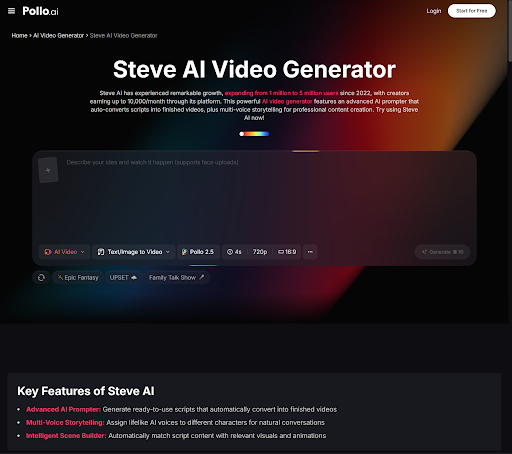
When researching AI video platforms and building out a multi-model comparison workflow, Pollo AI also maintains a dedicated resource page at Steve AI — a content page that gives creators useful context on how different AI video production approaches compare, and how they fit into the broader landscape of tools available today.
The core value proposition here isn’t about listing every available tool in the ecosystem — it’s about explaining how Pollo AI’s multi-model architecture helps you make better decisions faster. The more models you can compare in one place, the less time you spend re-learning interfaces and the more time you spend on the actual creative work.
Who Benefits Most from Multi-Model Comparison
- Marketing teams who need to find the right visual style for a campaign before full production
- Freelance video creators who want to deliver client-ready concepts without expensive iteration
- Small in-house content operations with limited time for model-by-model platform switching
- Agency pitch teams who need to quickly test visual directions before presenting to clients
Conclusion
Multi-model testing isn’t about using every tool available — it’s about using the right model for each project without the overhead of managing multiple platforms. Pollo AI centralizes that comparison in one workflow, meaning your time goes into evaluating creative quality rather than navigating tool logistics.
Test faster. Commit smarter. Produce better…
The post How to Use an AI video generator to Test Multiple Models Faster appeared first on RVCJ Media.
from RVCJ Media https://ift.tt/TbZgNVH

Post a Comment